HOW TO START A BLOG ON WORDPRESS
Table of Contents
How to start a blog on WordPress? It is super easy and simple. You can do it within minutes. WordPress offers multiple functionalities that cannot be seen in any other custom coding website. That is why Today most websites are being converted to WordPress. Its multiple themes and plugins make your blog on WordPress more beautiful and attractive. You can customize your blog as per your requirement without any custom code. No need to hire a professional for coding.
If you have Zero percent knowledge about coding, you can run your WordPress site easily. As we discussed above you can install your WordPress site within minutes. You have to just follow some steps before going forward. All these steps will be discussed in this article. How to install and make a WordPress blog? Let start the discussion without wasting more time.
GET A SEO FRIENDLY DOMAIN NAME
To start a free blog on WordPress first of all you have to purchase a domain name for your blog. The domain name should reflect the purpose of your blog. It means it should be SEO-friendly. To understand more about SEO You can visit this article WHAT IS SEO. There are many websites where you can purchase a domain name for your blog. But in my recommendation, you should purchase it from Namecheap. How to purchase a domain name and set up a bog? Complete step-by-step guidance is given below to purchase a domain name.
ACCOUNT CREATION WITH NAMECHEAP
If you have already a Namecheap Account, that,s fine. Otherwise, you have to sign up with Namecheap to purchase a domain name. You can create a Namecheap Account through this link Create Namecheap Account. A page will appear before you like this

SELECTING THE DOMAIN NAME
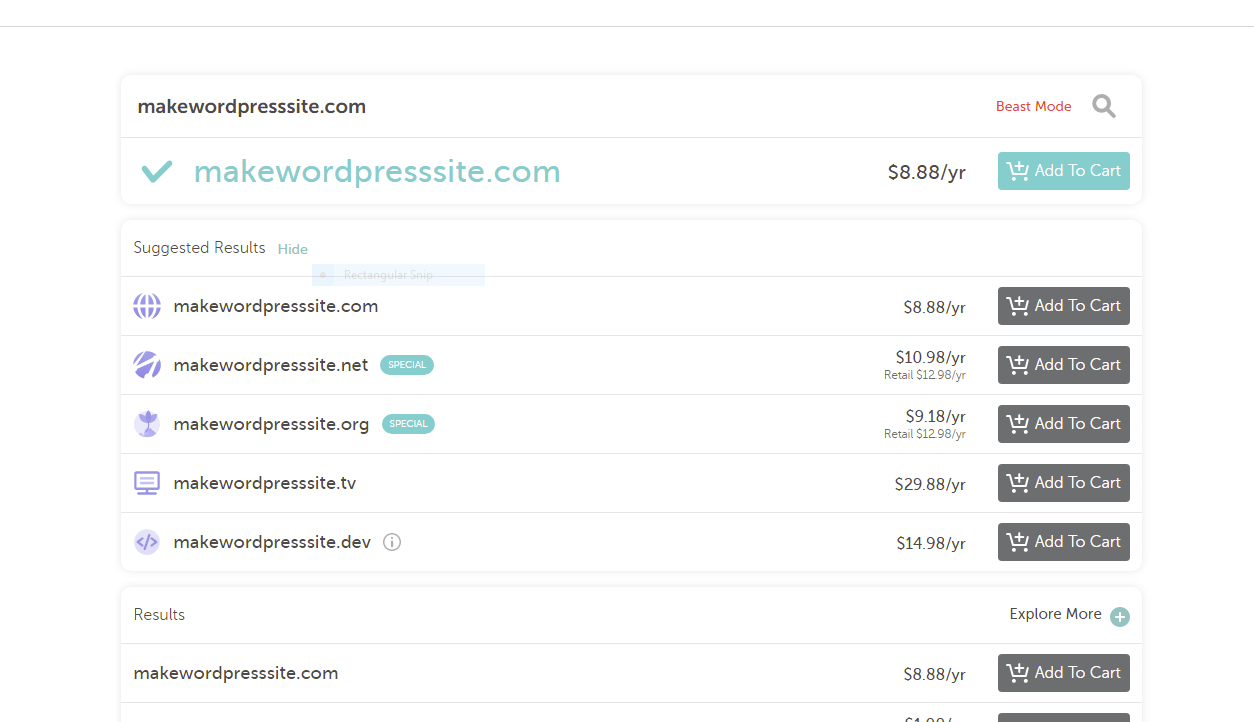
Now the next step is your domain selection if you have created the account. In this step, you have to select your domain name for your WordPress blog. Now the question is what is a domain name? In short, it is the address of your blog such as my domain name is communicationdive.com. Actually, a domain name is the address of your blog. You can choose a domain name from this link. Select your domain name. A new page will be open before you like this one.

ADD TO CART TO YOUR DOMAIN NAME
Now the next stage is to add to cart your domain name. You can select any domain that starts from .com, .org, .net, or anyone which one you like. After the selection of your domain name now you have to add it to the cart. This page will open before you. Scroll down this page and click on check out.
CONFIRM YOUR ORDER
It is the next step after clicking on the checkout page. On this page, Namecheap will ask you whether you want to confirm your order or not. If you want to confirm it, simply click on confirm the order. The page will look like this.

YOUR BILLING DETAILS
On the next page, your billing details will be asked by Namecheap to confirm your order. So it is mandatory to provide your billing detail to process the order further. The following page will be shown against your billing details.

WORDPRESS INSTALLATION
Now it is time to install WordPress on your domain name. After the purchase of the domain name, Namecheap will ask you whether you want to install WordPress or not. If you want, you should click on the Install button WordPress will be installed on your domain name. Afterward, it will again ask you about hosting. Obviously, you have to purchase the hosting too. So now the question is what is Hosting?
It,s answer is very simple. If your domain name is the address of your blog, Hosting is the place where your data will be stored. You can take the example of a Hard disk of your computer because all data is stored on the hard disk. For the first month Hosting by Namecheap will cost you only $1. After one month there will be $3.88 for every month. Now you have installed WordPress. The WordPress dashboard will appear before you. The following page will open

CREATIN YOUR FIRST POST ON WORDPRESS
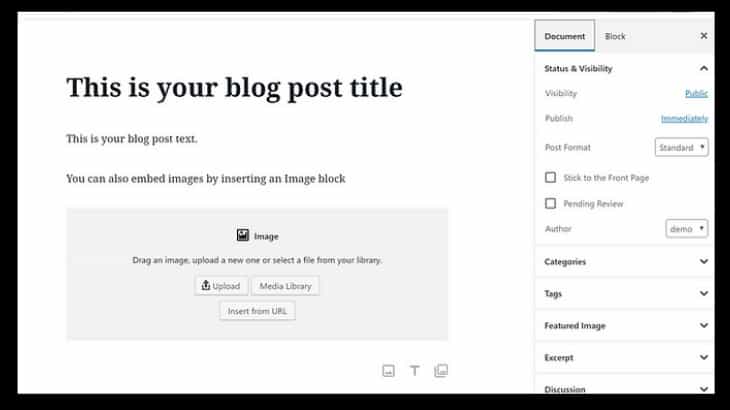
Boom, It is time to write your first post on WordPress. You can write anything that you like to write. To write with WordPress is very essay and simple. On the top and left side of your WordPress dashboard, there will be an option about posts. Click on it and again click on Add new post. A new page will open before you like the below picture.
SELECT YOUR THEME FOR YOUR BLOG
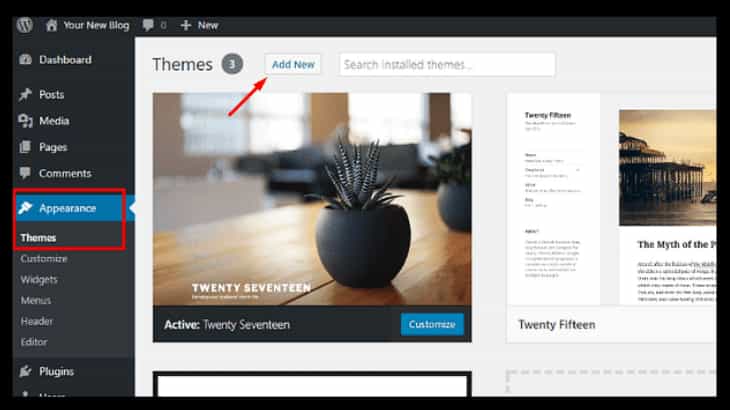
You can also choose your theme for your blog or website. It is also very easy and simple to change and manage your theme installation. See the right side of your dashboard and click on the appearance tab. Again you have to click on theme options in the Appearance section. This will show like this one.
Customization of your theme
After the installation of the theme, you can also customize the different sections of your theme. Consider the above picture again and click on the customization option below the theme option. A new window will open before you where you can easily manage and customization of your WordPress blog. The theme customization picture is given below.
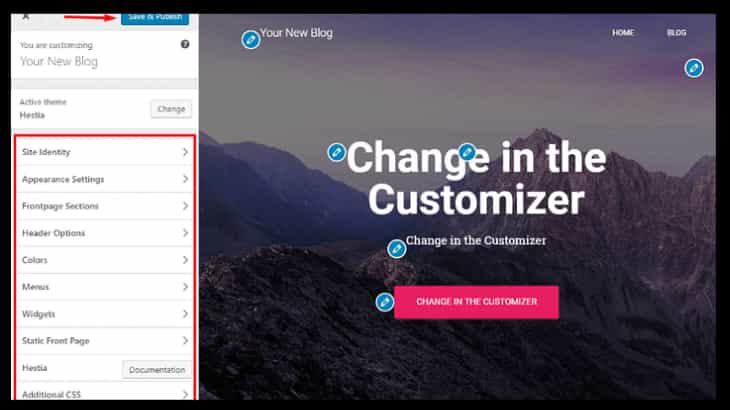
- In the theme customization section, you can manage the different aspects of your theme.
- You can change the logo of your theme.
- You can customize the header section of the theme.
- You can also change the footer section of your website.
- There are multiple options you should explore individually.
- WordPress gives you a lot of functionalities with greater ease.
Conclusion
To sum up the discussion we can say that making a blog with WordPress is very easy. A non-technical person can handle WordPress sites easily. You can also install and manage it without any additional knowledge about coding. Whether you want to make an e.commerce site, educational site, or any other site, you can develop it.